Controller-first gaming utility for Windows.
Turn your gaming PC into couch mode.
Turn on your controller and CouchMode opens your chosen gaming experience, prepares the session around your preferences, and brings you back to a usable desktop when you’re done.
Windows 11 · 64-bit · Signed public beta
The gap
Windows works.It just wasn't built for the couch.
Your desktop works well at a desk. From the couch, small text, mouse-first menus, and background apps can get in the way of a controller-first gaming session. CouchMode bridges that gap without replacing Windows or taking over your PC.
Designed for the big screen
Windows desktop interfaces are built for close viewing. CouchMode helps move the session into a controller-friendly gaming experience.
Controller-first
CouchMode can react when a compatible controller connects and start the gaming experience you selected.
Leaves your setup intact
CouchMode changes only the supported session settings you enable and restores the settings it changed when the session ends.
How it works
From controller to couch.
CouchMode handles the session flow around the launcher and Windows settings you choose. Free covers the essential controller-first flow. Pro adds deeper session automation.
- STEP 01
Turn on your controller
Wake your Xbox or compatible controller. CouchMode can listen in the background and start your couch session automatically.
Auto-detected · No app to open
- STEP 02
CouchMode opens your chosen gaming experience
Use the Windows Xbox full-screen experience where supported, or choose Steam Big Picture or Playnite. All three are free. Other compatible custom launchers are available with Pro.
Xbox, Steam and Playnite are Free · Custom launchers with Pro
- STEP 03
Pro prepares the session
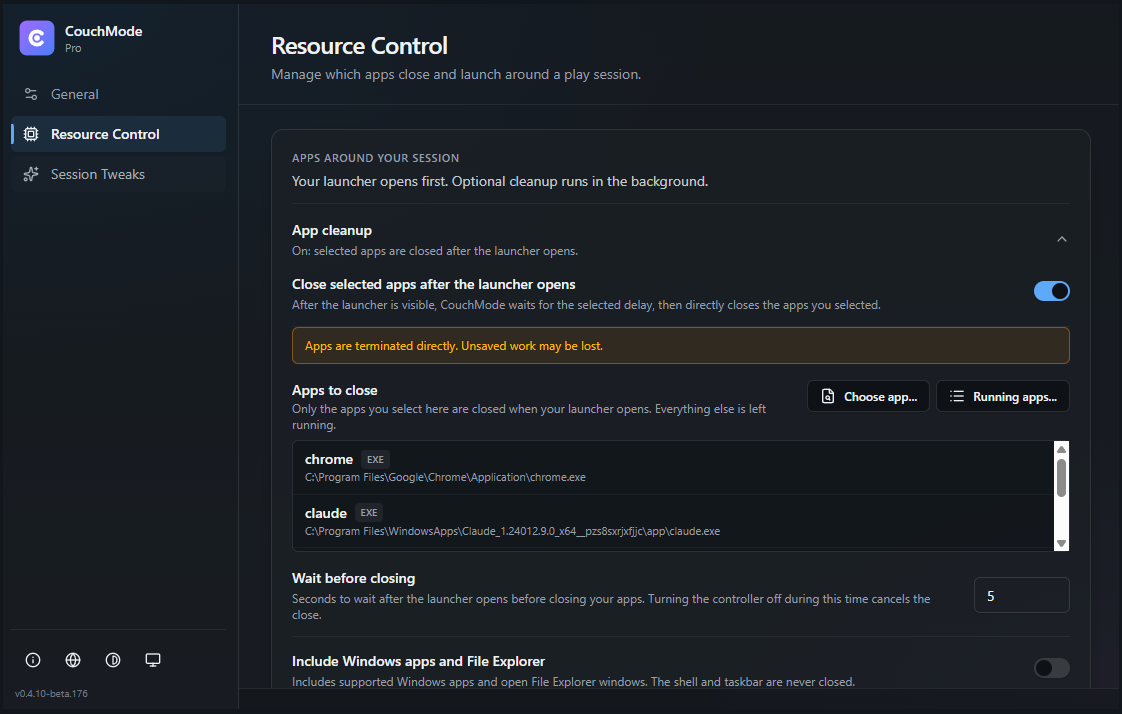
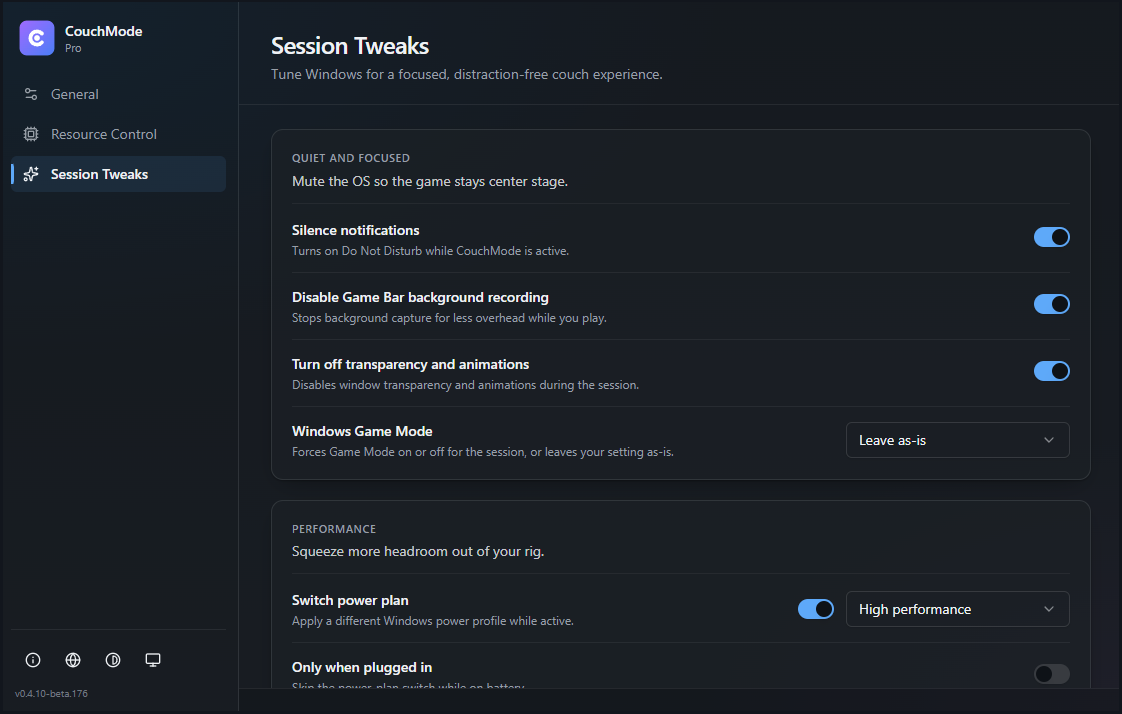
Pro can close the desktop apps you select through Resource Control and apply the supported session settings you choose, including notifications, Game Bar recording, visual effects, Game Mode, power plan, HDR, display and audio.
Pro · 7-day in-app trial
- STEP 04
Return to your desktop
When the session ends, CouchMode exits the gaming experience it started, restores the Windows settings it changed and returns control to the desktop.
Free + Pro · Safe session return
A closer look
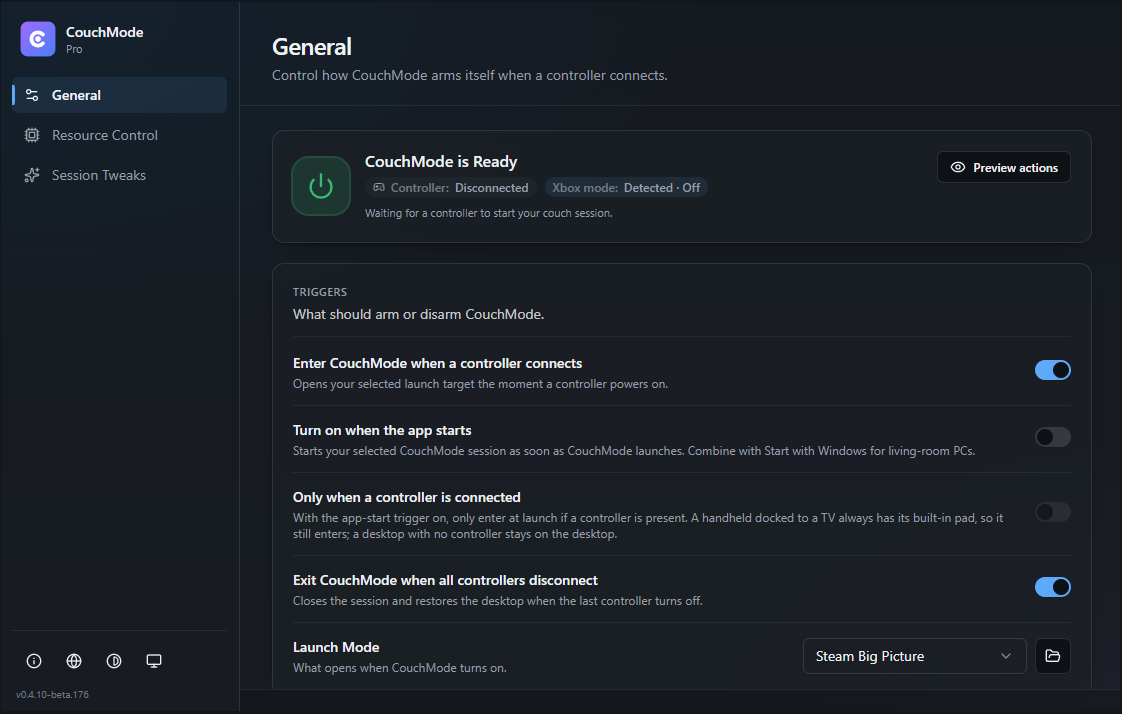
More of the Pro settings, straight from the app.
These are real CouchMode screens, not mockups. Select any screen to view it larger.
Free vs Pro
Free for the launchers you use. Pro for deeper automation.
The controller-first session flow is free, and so are Xbox, Steam Big Picture and Playnite. Pro adds custom launchers, Resource Control, Session Tweaks, and deeper restore automation.
Free
Core controller-first session flow.
- Start from your controller
- Xbox full-screen experience where Windows supports it
- Steam Big Picture
- Playnite Fullscreen
- Start with Windows
- Safe session exit and desktop return
- Language and theme
Pro
CouchMode manages the session it starts, then restores the desktop settings it changed.
- Compatible custom launchers
- Resource Control for the apps you select
- Session Tweaks: notifications, Game Bar recording, visual effects, Game Mode, power plan, HDR, display, and audio
- Restores the supported Windows settings CouchMode changed
- Reopens selected Resource Control apps when configured
- Up to 2 active Windows devices with Pro
- Up to 5 active Windows devices with Pro Supporter
Pro access requires an active Patreon membership after the trial. Pro is $3/month and includes 2 active Windows devices. Pro Supporter is $5/month and includes 5 active Windows devices.
Windows Couch Gaming Guides
Straight answers for Playnite, Steam Big Picture, TV setups, controllers, and docked Windows handhelds.
How to Open Playnite Fullscreen with a Controller
Use Playnite's controller-ready Fullscreen mode, then optionally start it when Windows detects a compatible XInput controller. Includes existing-window and focus checks.
Updated Sep 11, 2026
How to Open Steam Big Picture with a Controller
Open Steam Big Picture with an Xbox or supported controller. Learn Steam's native option, then set up an optional CouchMode session without taking over Steam already in use.
Updated Sep 11, 2026
How to Make a Windows 11 Gaming PC Feel More Like a Console
Build a controller-first Windows 11 living-room workflow with Xbox full-screen where available, Steam Big Picture, or Playnite.
Updated Sep 11, 2026
Ready to make your PC couch-native?
Download the signed Windows public beta and start with a 7-day in-app Pro trial. No account or credit card is required for the in-app trial.
CouchMode supports controller-first Windows handheld setups, including devices such as ROG Ally. Where Windows provides the Xbox full-screen experience, CouchMode can start or adopt that session and return control to the desktop when the session ends. Availability and behavior depend on the device, Windows version, Xbox app support, region and Microsoft rollout.
Questions
Built for the way PC players actually start a couch session.
CouchMode is designed for Windows PCs used with a TV or in a controller-first setup. These answers explain what it can start, what it can automate, and what depends on Windows support.